
فهم الحاجة إلى الاستبدال
مع مرور الوقت، تتعرض مكونات الحاسوب المحمول (Laptop) مثل البطاريات ومحولات الطاقة (الشواحن) للاستهلاك الطبيعي، أو للتلف نتيجة الحوادث العرضية مثل انسكاب السوائل أو الارتفاع المفاجئ في التيار الكهربائي. وعادةً ما تظهر البطارية التالفة أعراضاً مثل النفاد السريع أو العجز التام عن الاحتفاظ بالشحن؛ مما يضطر الجهاز للعمل فقط عند توصيله بالقابس. ولحل هذه المشكلة، يتعين عليك معرفة رقم الموديل (Model Number) الدقيق لضمان توافق القطع البديلة بنسبة 100%.
أين ستجد رقم الموديل؟
يعد رقم الموديل الوسيلة الأكثر أماناً وموثوقية للحصول على قطع الغيار الصحيحة. وهو متواجد دائماً تقريباً على الغطاء السفلي للجهاز.
لأجهزة الحواسيب المحمولة (Windows / أجهزة الألعاب): ابحث عن ملصق (Sticker) أو نص محفور على القاعدة السفلية للجهاز. وغالباً ما يكون مصحوباً بعبارة "Model" أو الاختصار "M/N".
أجهزة الماك بوك (MacBooks): تقوم شركة آبل بطباعة هذه البيانات بخط صغير جداً على الغطاء الخلفي السفلي. ويبدأ النص دائماً بكلمة "Model" يليه حرف A متبوعاً بأربعة أرقام (على سبيل المثال: Model A1466).
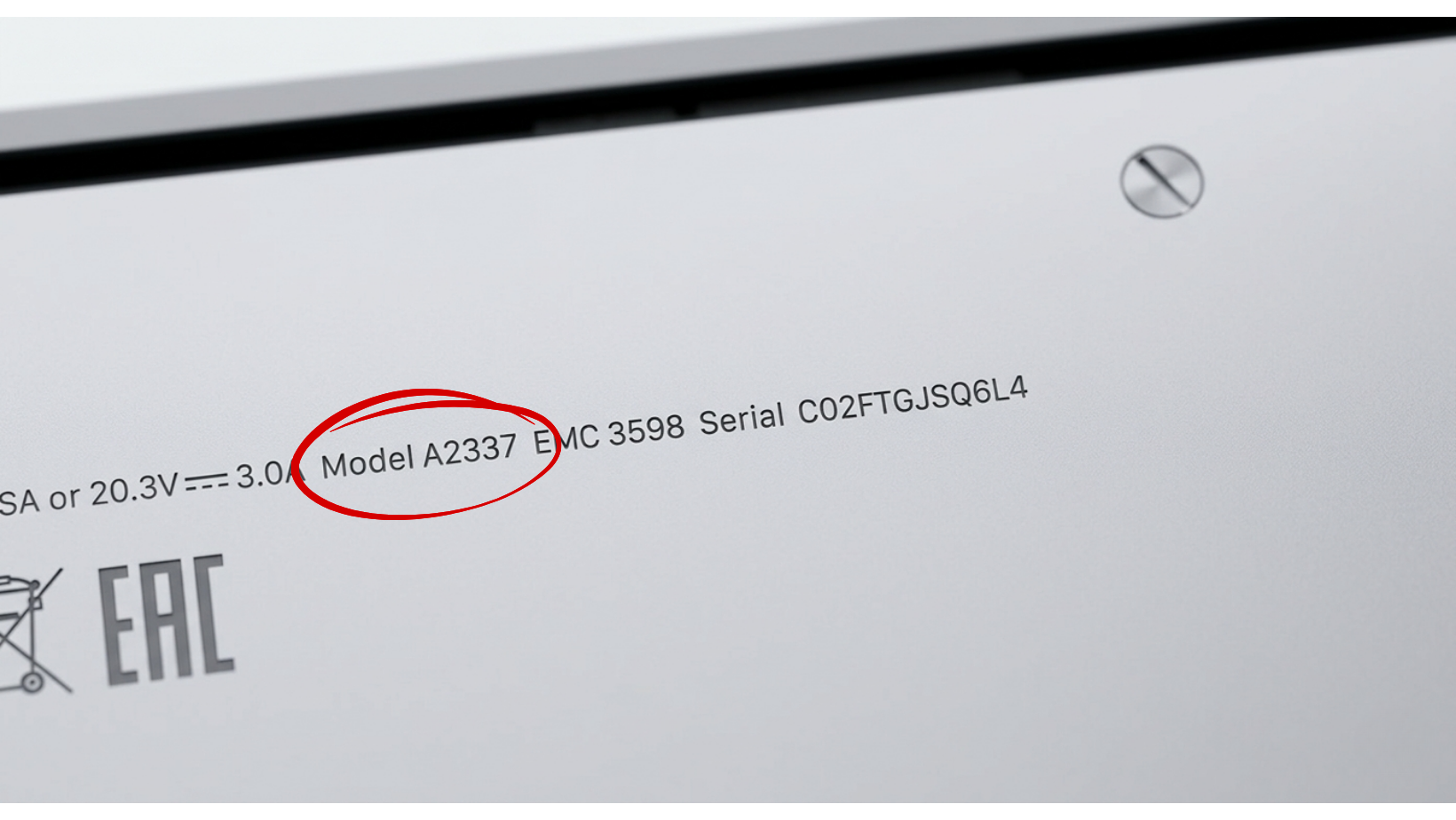
نصيحة أخيرة قبل الشراء ..
احرص دائماً على التقاط صورة واضحة لبيانات الموديل الموجودة أسفل الجهاز قبل الشراء. وتذكر أن تزويد البائع أو الفني برقم الموديل الدقيق يحمي اللوحة الأم (Motherboard) من التلف، ويضمن لك الحصول على القدرة الكهربائية (Wattage) الصحيحة والمطابقة لشاحنك.
هل ما زلت غير متأكد من موديل حاسوبك المحمول؟
إن اقتناء بطارية أو شاحن غير متوافقين قد يتسبب في حدوث التماس كهربائي وتدمير اللوحة الأم لجهازك. إذا كنت تجد صعوبة في تحديد مواصفات حاسوبك، فلا تخمن!
تفضل بزيارة هيكس تكنولوجي في البحرين، وسيقوم فريقنا المتخصص بتحديد الموديل الدقيق لجهازك فوراً، وتزويدك بقطع الغيار الأصلية والمضمونة المتوافقة معه تماماً.
نحن نجعل صيانة حاسوبك المحمول مهمة سهلة وخالية من القلق!