تخطي للذهاب إلى المحتوى
  • الْعَرَبيّة English (US)
Data Recovery - Hex Tech
  • 0
    عربة تسوقي
  • تسجيل الدخول
  • الرئيسية
  • معلومات عنّا!
    • معلومات عنا
  • متجرنا
  • خدماتنا
    • الخدمات
    • الدعم الفني عن بُعد
    • إصلاح البرمجيات - الأجهزة
    • فتح الهاتف
  • Donor Drives
  • قدّم حالتك!
  • المدونة
  • مساعدة
    • قدّم تذكرة
Data Recovery - Hex Tech
  • 0
    • الرئيسية
    • معلومات عنّا!
      • معلومات عنا
    • متجرنا
    • خدماتنا
      • الخدمات
      • الدعم الفني عن بُعد
      • إصلاح البرمجيات - الأجهزة
      • فتح الهاتف
    • Donor Drives
    • قدّم حالتك!
    • المدونة
    • مساعدة
      • قدّم تذكرة
  • الْعَرَبيّة English (US)
  • تسجيل الدخول

Printer Maintenance

Do you want your printer to be in good condition? Here's how to make it last longer.
  • كافة المدونات
  • Support
  • Printer Maintenance
  • 1 يونيو 2024 بواسطة
    Printer Maintenance
    Hex Technology

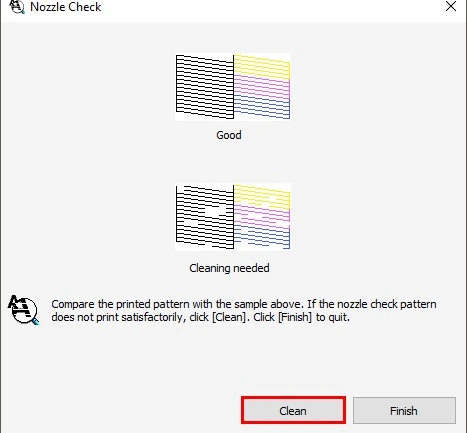
    NOZZLE CHECKS

    Nozzle Check helps you identify clogged or faulty nozzles in your printer.  Although the process varies depending on the model, the goal is the same.  Creates a test page to check printer nozzle functionality. If the test page shows contamination, the nozzle is working properly. However, broken or missing cables indicate a problem.

    Instructions:

      Right-click the printer icon on the taskbar, and then select Nozzle Check. Or access the printer software, click the Maintenance tab, and then click the Nozzle Check button.  Run a nozzle check to confirm that the print head is clean. You may need to clean the print head up to 4 times.

    CLEANING THE PRINTER AND PRINTER HEADS

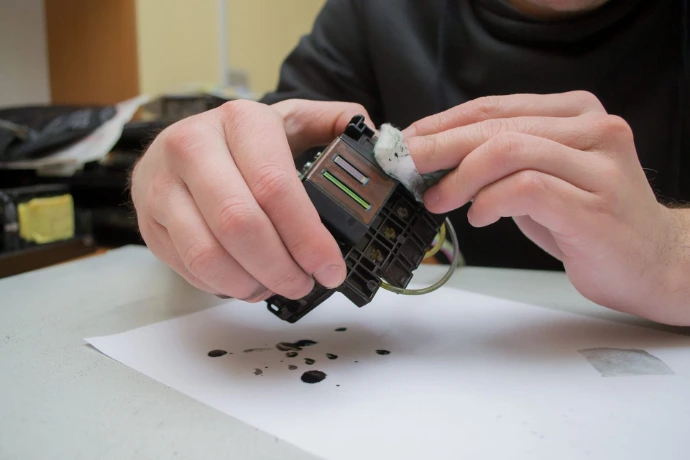
    Nowadays, most printers have an automatic head cleaning option in their menu. If not, you may consider this Microfiber cloth effectively removes dust and dirt. Remember to turn off the printer before cleaning the inside. 

    For Automatically Cleaning the Print Head

    1. Press the home button, if necessary.
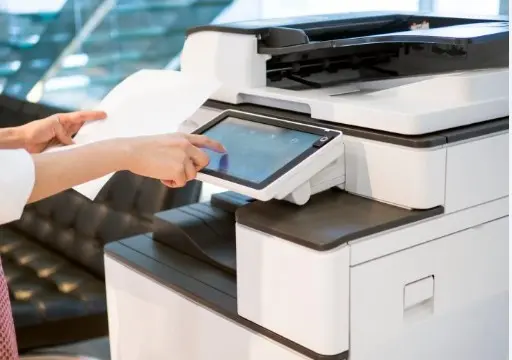
    2. Select Auto Cleaning.
    3. Select Start to clean the print head. ...
    4. Select Yes to print a nozzle check pattern and follow the on-screen instructions.


    PERFORMING UPDATES

    Manufacturers often release printer firmware, software and driver updates. These updates help improve performance, fix bugs, and improve device usability. To perform these tasks, check your printer's control panel or visit the manufacturer's website for more information.

    Firmware Update Instructions

    1. Open a browser (for example, Internet Explorer, Mozilla Firefox, Google Chrome, and more), and then enter the printer IP address.
    2. Click Device.
    3. Scroll down, and then click Update Firmware.
    4. Click Check for updates button.
    5. If a new update is available, then click I agree, start update. 


    في Support
    Printer Maintenance
    Hex Technology 1 يونيو 2024
    شارك هذا المنشور

    Great stories have a personality. Consider telling a great story that provides personality. Writing a story with personality for potential clients will assist with making a relationship connection. This shows up in small quirks like word choices or phrases. Write from your point of view, not from someone else's experience.

    Great stories are for everyone even when only written for just one person. If you try to write with a wide, general audience in mind, your story will sound fake and lack emotion. No one will be interested. Write for one person. If it’s genuine for the one, it’s genuine for the rest.

    علامات التصنيف
    مدوناتنا
    • ​Software
    • Support
    • Tips and Tricks
    • Repair
    • New
    • Data Recovery
    • السفر

    DATA RECOVERY 

    We professionally recover data from Hard drives, RAID/SAN/NAS Systems, Solid State Drives, Flash drives, and Tapes and have the expertise in logical recovery from Microsoft Exchange® and Microsoft SQL® databases and the whole spectrum of file systems.

    Contact us

    روابط مفيدة ..
    • الرئيسية
    • منتجاتنا
    • خدماتنا
    • الشروط والأحكام
    تواصلوا معنا ..
    • للتواصل ..
    • info@hex.technology
    • +973 33217825
    • 📍   https://maps.app.goo.gl/UMda5YMLWfqVYQTN8

    تابعنا
    Copyright © Hex Technology
    الْعَرَبيّة | English (US)
    مشغل بواسطة أودو - Hex Technology Data Recovery Bahrain