
Many users divide their large internal hard drives (HDD) into multiple partitions. While partitioning is excellent for organizing files and separating the Operating System from personal data, it doesn't protect you from hardware failure.
🔍 What is Disk Partitioning?
Partitioning is the process of dividing a physical hard drive into multiple logical sections. This makes data management easier and speeds up virus scans or backups. However, if the Partition Table or the physical sectors housing it become damaged, the entire partition may "disappear" or show as "Unallocated Space."
🛠️ Case Study: Partition Recovery from a Failing HDD
A regular client brought us a laptop hard drive that was powering on, but the specific partition containing their critical work files was no longer accessible.
Our Diagnostic Process:
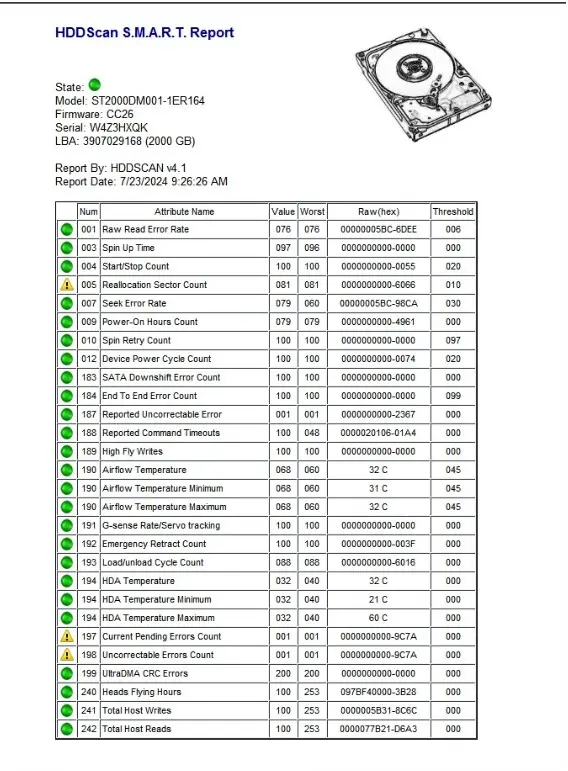
HDD Health Check: We used professional diagnostic tools (like HDDScan and specialized hardware imagers) to check for hardware errors and S.M.A.R.T. status.
The Verdict: The drive wasn't just "glitching"—it was suffering from media degradation (Bad Blocks). The drive was becoming too weak to read the specific sectors where the partition data was stored.
Common Mistake: The client tried using a USB docking station to move the data, but the drive was too unstable for a standard Windows environment to handle.
🏆 The Result: 100% Recovery
By using professional data recovery equipment that bypasses Windows' limitations, we stabilized the "weak" drive and successfully cloned the damaged partition. All data was recovered and safely transferred to a new, reliable flash drive.
⚠️ Expert Advice for HDD Issues:
Lower Damage = Lower Cost: The sooner you bring a failing drive to a specialist, the easier (and cheaper) the recovery will be.
Avoid DIY Stress: Repeatedly trying to "force" a weak drive to read through a docking station can cause the read/write heads to crash, leading to permanent data loss.
Stop at the First Sign: If a partition disappears or your PC starts freezing, shut it down immediately.
Facing a partition error? Contact Hex Technology for a professional evaluation before the damage gets worse.