
Micro SD cards are essential for smartphones, gaming consoles, and especially Security Cameras. However, the market is flooded with "fake capacity" cards that can lead to permanent data loss.
⚠️ What is a "Fake Capacity" Card?
The most common type of fraud is Capacity Expansion. Hackers use illegal software tools to trick a computer or camera into seeing a large capacity (e.g., 128GB) on a card that actually only has 32GB of real storage.
The Danger: Initially, the card seems to work. However, once your data exceeds the true 32GB limit:
New data will overwrite old files.
Files will become corrupted or "Unusable."
Security cameras will fail to save critical footage during emergencies.
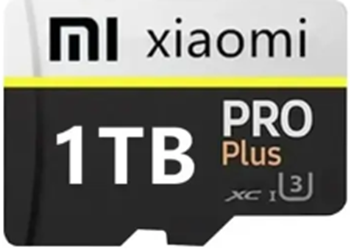
🔍 Common Signs of a Fake SD Card:
Unrealistic Capacity: A high-capacity card (like 512GB) sold at an unbelievably low price.
Reduced Read/Write Speeds: The card performs much slower than the "Class 10" or "V30" rating printed on the label.
Fake Branding: Poor quality printing on the card or packaging (e.g., "Sandshik" instead of "SanDisk").
Formatting Failures: High-end cameras may fail to format the card in FAT32 or exFAT because the internal controller cannot verify the fake space.
🛠️ How to Test Your SD Card?
(Step-by-Step):
1. Inspect the Packaging: Check for official holograms, clear fonts, and necessary product information. Fake products often have blurry text or missing serial numbers.
2. Use Verification Software: Don't just trust what your computer says. Use professional tools to test the actual capacity:
H2testw (PC): The gold standard for verifying real storage space.
FakeDeviceTest (Android): Great for checking cards directly on your phone.
3. The "Full Load" Test: Try to fill the card with large, non-critical files (like movies) until it's nearly full. Then, try to open the files you copied first. If they are corrupted, the card is a fake.
💡 Hex Technology Pro-Tip:
Security camera data is too important to risk. A fake card won't just fail; it might prevent the camera app from functioning entirely. Always buy from reputable sources and avoid "too good to be true" deals.
Is your SD card acting strangely? Bring it to Hex Technology in Bahrain for a professional diagnostic!