
Do you have an old PC that has been sitting in storage for years? While the computer itself might be too outdated to upgrade or repair, the treasures inside—your photos, documents, and memories—can still be saved.
🔍 The Case: A Legacy System Diagnosis
A client recently brought us a very old desktop PC. After a full technical evaluation, we determined that the system was no longer compatible with modern software or hardware parts. However, the client’s priority was the data stored on the internal drives.
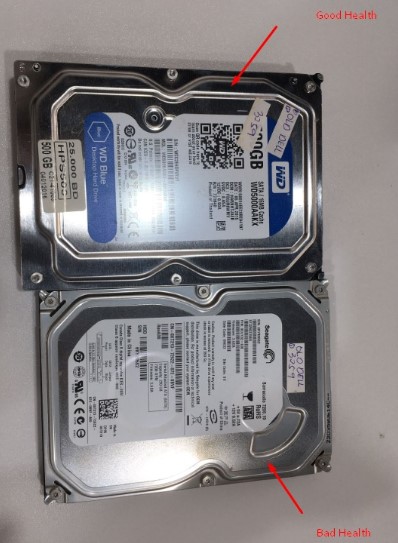
Our Technical Findings: Upon extracting the storage, we discovered two hard drives with different conditions:
Drive A (Critical): Shown to have "Bad Health" with multiple failing sectors. This drive required immediate emergency extraction.
Drive B (At Risk): Although currently functional, it showed signs of "Degraded Health." In older drives, a sudden failure is highly likely if they are forced to run for long periods.
🛠️ The Professional Solution: Preventive Recovery
Instead of simply copying files (which can stress a weak drive and cause it to die completely), we used professional data recovery tools to:
Clone the drives: Creating a bit-by-bit copy to prevent data loss during the process.
Stabilize the Hardware: Working at a hardware level to bypass the "Bad Sectors."
Final Migration: Successfully transferring all recovered data to a brand-new, reliable storage device.
💰 Affordable & Transparent Pricing
In the world of Data Recovery, prices depend on the condition of the drive. Because this client took action before the drives completely failed, we were able to provide a successful recovery at an affordable price. Waiting until the drive is "dead" often makes the process much more complex and expensive.
✅ Don't Wait for the "Crash"
If you have an old PC, laptop, or hard drive that is no longer in use, don't wait until it stops working entirely. Visit Hex Technology for a professional health check and data backup.
Expertise: Legacy system recovery & hardware stabilization.
Result: 100% Success for this case!
WhatsApp: +973 33217825
Location: Isa Town, Bahrain.