
When a hard drive stops detecting, many IT technicians or users attempt a "Quick Fix" by swapping the drive's logic board (PCB) with one from a similar model. However, in modern hard drives, this often makes data recovery impossible if the original board is lost.
🔍 The "ROM" Secret: Why Boards Aren't Interchangeable
Every hard drive has a unique Adaptive Data chip (ROM) on its PCB. This chip contains specific calibration information required for the heads to read the platters.
The Conflict: If you swap the PCB without moving the original ROM chip, the drive will not boot, and in some cases, it may cause permanent damage to the internal heads.
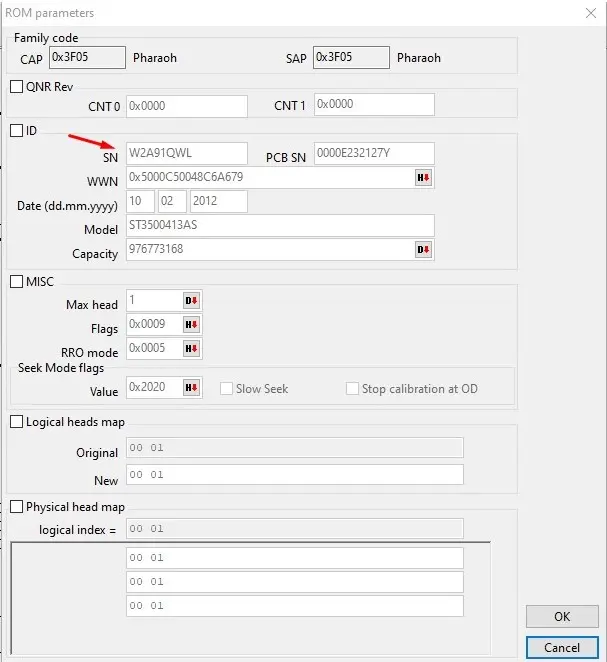
🛠️ Case Study: The Mismatched Seagate Drive
We recently received a 500GB Seagate Hard Drive from a corporate client in Saudi Arabia. The drive was not detecting, and upon inspection, we discovered a critical issue: the PCB attached to the drive did not match the drive’s internal serial number (Z3TJJX9R).
The Challenge: The client's internal team had attempted to swap the boards, hoping it would fix the power issue. Fortunately, they had kept the original PCB. Without the original board (and its unique firmware data), the recovery would have been a "Mission Impossible."
🏆 The Recovery Process:
Verification: We matched the original PCB components with the drive's microcode.
Firmware Repair: We stabilized the drive's firmware and corrected the errors caused by the mismatched board attempt.
Cloning: Once the drive was stable, we performed a full Bit-by-Bit Clone to ensure 100% data integrity.
The Result: 100% Success! All company data was recovered and returned to the client exactly as it was before the failure.
💡 Advice from Hex Technology:
If your hard drive fails, do not swap the PCB yourself.
Keep it Original: If you have already tried to swap the board, always keep the original one. It is the "key" to your data.
Consult Professionals: A mismatched board can lead to permanent data loss if handled incorrectly.
✅ Trusted Data Recovery in Bahrain
At Hex Technology, we specialize in complex firmware and PCB repairs. Whether you are in Bahrain or Saudi Arabia, we provide fast, professional solutions for your most critical data loss cases.
WhatsApp: +973 33217825
Location: Isa Town, Bahrain.