
Skip to Content
  • الْعَرَبيّة English (US)
Data Recovery - Hex Tech
  • 0
    My Cart
  • Sign in
  • Home
  • Our Shop
  • Our Services
    • Services
    • Remote IT Support
    • Software -  Hardware Repair
    • Unlock Phone
  • Donor Drives
  • Submit your case!
  • Our Blog
  • About Us!
    • About Us
  • Help
    • Submit a Ticket
Data Recovery - Hex Tech
  • 0
    • Home
    • Our Shop
    • Our Services
      • Services
      • Remote IT Support
      • Software -  Hardware Repair
      • Unlock Phone
    • Donor Drives
    • Submit your case!
    • Our Blog
    • About Us!
      • About Us
    • Help
      • Submit a Ticket
  • الْعَرَبيّة English (US)
  • Sign in

How to Identify Your Laptop Model for Battery & Adapter Replacement?

  • All Blogs
  • Repair
  • How to Identify Your Laptop Model for Battery & Adapter Replacement?
  • September 4, 2024 by
    How to Identify Your Laptop Model for Battery & Adapter Replacement?
    Hex Technology
    | Updated on March 2026

    ​


    Understanding the Need for Replacement

    Over time, laptop components like batteries and power adapters wear out or sustain damage from accidents, such as liquid spills or electrical surges. A failing battery typically drains rapidly or fails to hold a charge, forcing the laptop to operate only when plugged in. To resolve this, you must find the exact Model Number to ensure compatibility.

    Where to Find the Model Number

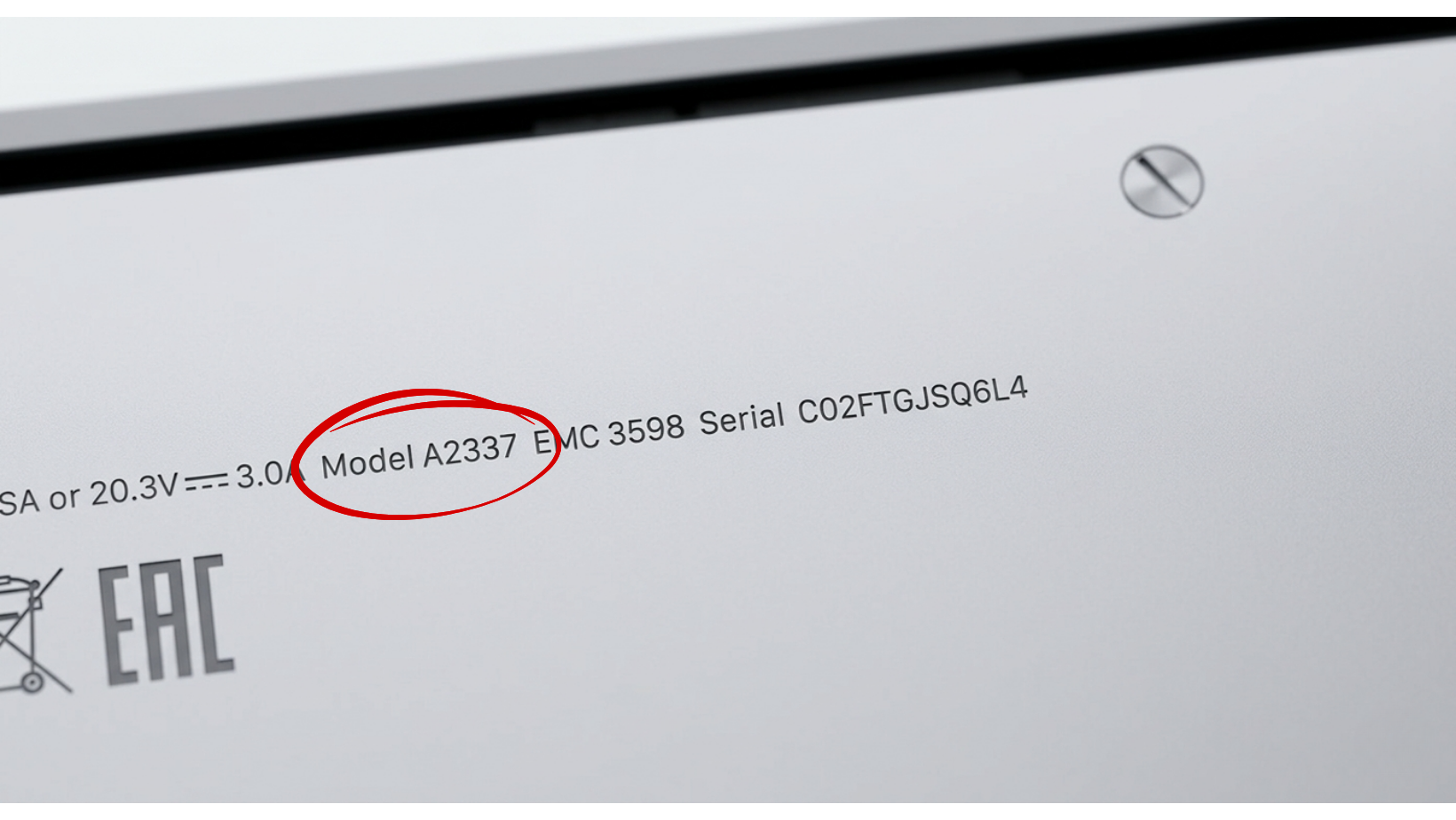
    The model number is the most reliable way to source spare parts. It is almost always located on the bottom casing of the device.

    • For PC Laptops (Windows/Gaming): Look for a sticker or engraved text on the base. It is often labeled as "Model" or "M/N".

    • For MacBooks: Apple prints this in very small text on the back. It starts with the word "Model" followed by the letter A and four digits (e.g., Model A1466).


    Final Tip Before Purchasing

    Always take a photo of the model information before buying spare parts. Providing the exact model number to the technician or seller prevents damage to the motherboard and ensures you receive the correct wattage for your adapter.


    in Repair
    How to Identify Your Laptop Model for Battery & Adapter Replacement?
    Hex Technology September 4, 2024
    Our blogs
    • ​Software
    • Support
    • Tips and Tricks
    • Repair
    • New
    • Data Recovery
    • Our blog
    Sign in to leave a comment
    Useful Links
    • Home
    • Products
    • Services
    • Terms & Conditions
    Get In Touch ..
    • Contact us
    • info@hex.technology
    • +973 33217825
    • 📍   https://maps.app.goo.gl/UMda5YMLWfqVYQTN8

    Follow us
    Copyright © 2026 Hex Technology
    الْعَرَبيّة | English (US)
    Powered by Odoo - Hex Technology Data Recovery Bahrain