
Hardware Replacement and macOS Installation
Owning an iMac is a great choice for both personal and professional use due to its elegant design and streamlined interface. Many users prefer an iMac over a traditional desktop for its creative features, ease of use, and all-in-one functionality. Today, businesses favor the iMac not only for its aesthetic appeal but also for its powerful software ecosystem.
If your iMac is experiencing slow or sluggish performance, here is a guide on how to upgrade it effectively:
Important Safety Tips:
Data Backup: Always back up your important files to an external drive or cloud storage before handing your device to a repair shop.
Safe Handling: iMacs are heavy and fragile. When transporting your device, use the original packaging or a padded box to avoid scratches or screen damage.
The Upgrade Process:
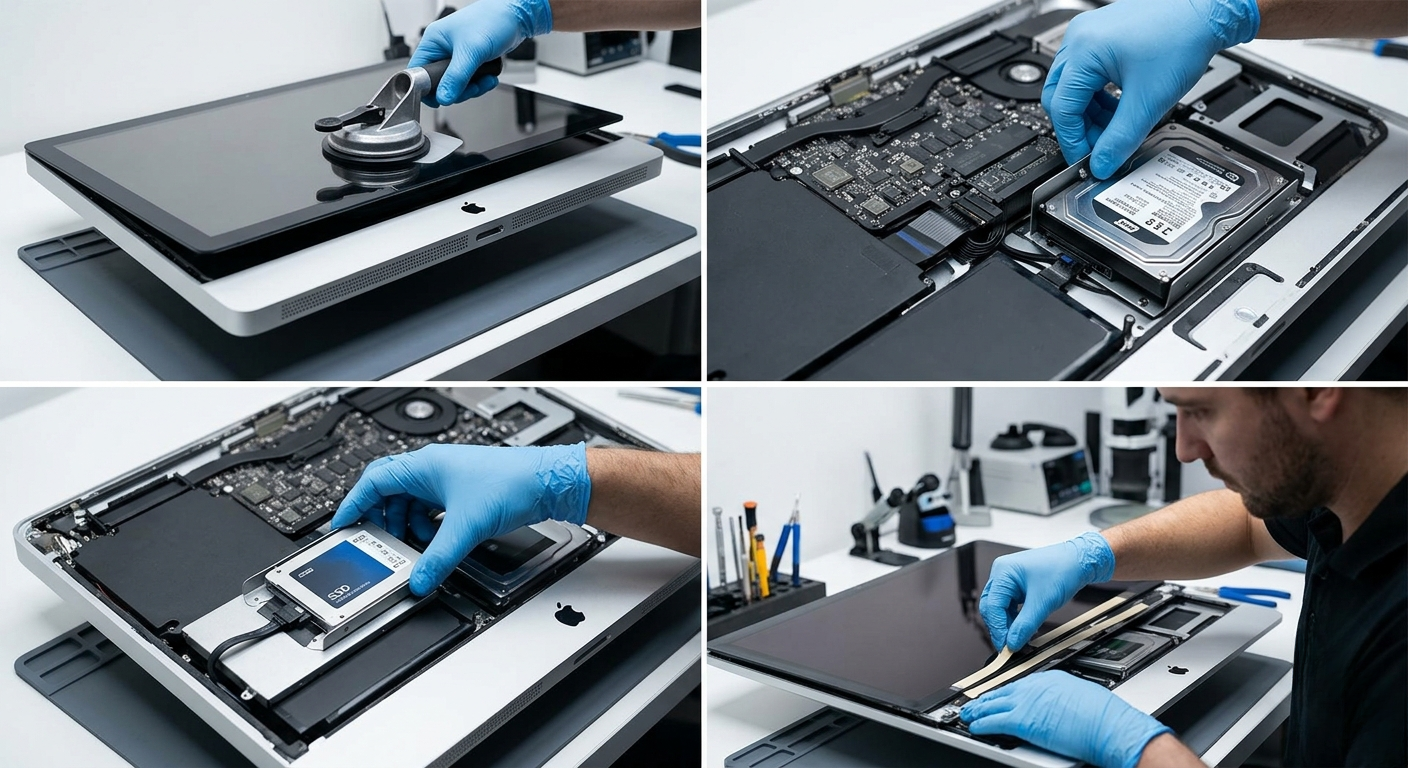
Initial Inspection: We begin with a thorough internal and external diagnostic check to ensure the device is in good condition.
Professional Handling: To maintain a pristine finish, we wear gloves during the process to prevent fingerprints or micro-scratches on the display.
Hardware Upgrade: Depending on the user's needs, we replace the old drive with a high-capacity SSD for maximum speed.
Software Installation: Once the hardware is secured, we install the latest compatible macOS.
Final Assembly: After testing, we use professional-grade adhesives to ensure the screen is securely reattached to the frame.
The result is an iMac that feels brand new, with a significantly faster operating system and improved overall performance.
Maximize Your Mac’s Potential with Hex Technology ..
Your iMac or MacBook often has years of untapped potential that can be unlocked with the right hardware adjustments. At Hex Technology, we specialize in high-performance Mac upgrades, utilizing advanced diagnostic tools to identify the exact components that are slowing you down. Whether it’s swapping a sluggish hard drive for a lightning-fast SSD or expanding your RAM for professional creative work, we ensure a seamless transition without compromising your data. Don't let a slow system hinder your productivity; visit us in Bahrain today for a professional and seamless experience, and let our team provide the specialized expertise needed to upgrade your Mac’s performance to its absolute peak.