
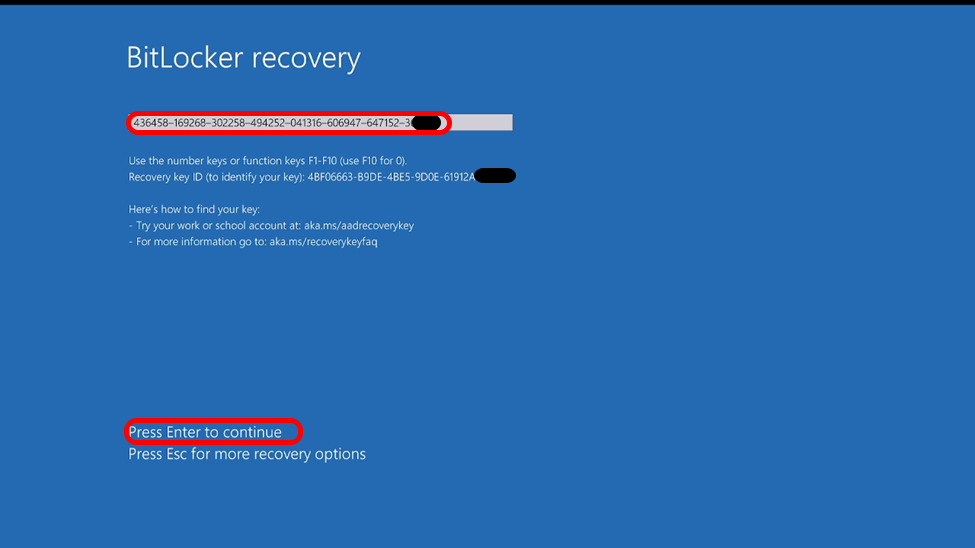
If your system suddenly prompts you for a BitLocker Recovery Key, it means the encryption security has been triggered to protect your data. BitLocker is a powerful Windows technology that encrypts your drive, and without the correct key, the data remains inaccessible.
Where to Look for Your Recovery Key:
Depending on how BitLocker was set up, your 48-digit key might be in one of these locations:
Your Microsoft Account: This is the most common location. Sign in to your Microsoft account from another device to retrieve it.
A Physical Printout or PDF: You may have printed the key or saved it as a document when encryption was first enabled.
On a USB Flash Drive: If you saved the key to a thumb drive, plug it into another computer to read the text file.
Official Microsoft Support Link:
For a step-by-step guide on retrieving your key, visit: Find your BitLocker recovery key in Windows
⚠️ Critical Warning:
If you cannot provide the BitLocker Recovery Key, your data is permanently lost. There is no "backdoor" or software that can bypass BitLocker encryption. Without the key, even professional data recovery services cannot rescue your files.
Take Action Now: Do not wait for an emergency. Verify that you have your BitLocker key saved securely today.
Finding your BitLocker recovery key can be a daunting task, but it’s often the only bridge between you and your valuable data. At Hex Technology, we assist users in navigating these complex encryption scenarios, providing expert guidance on where to look and what to do if the key remains elusive. We utilize advanced diagnostic tools to evaluate locked systems and ensure that any further steps taken don’t compromise your data integrity. Before you resort to a factory reset and lose everything, visit us in Bahrain today for a professional and seamless experience, and let our team help you regain access to your digital life safely.